Network Management Dashboard
asd netAll your services. One terminal.

Auto-Detection
Python, Node, PHP, Ruby - detected automatically. No config needed.
Tunnel Control
Start/stop per service. Direct or Caddy-routed.
Keyboard First
Vim bindings. Navigate without reaching for mouse.
How It Works
Install
One-liner. No dependencies.
curl asd.host/install.sh | sh

Launch
Open the TUI.
asd netDone
See all your services.
Scenarios
Starting microservices...
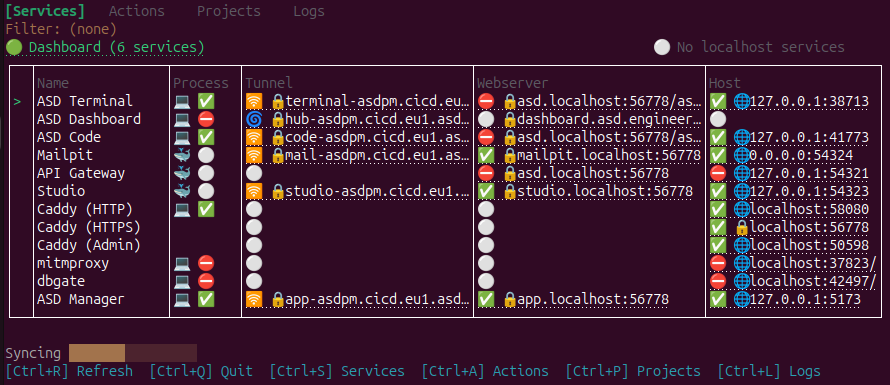
asd net shows all 12 services. Toggle tunnels individually.
Debugging webhooks...
Open mitmproxy directly. Inspect traffic in seconds.
Sharing with team...
Tunnels expose your local services. Share one URL.
Frequently Asked Questions
asd net opens an interactive terminal interface showing all detected and configured services. You see their status, ports, tunnel mode, and can start/stop them or open their URLs directly.
No. The interface is visual - green means running, red means stopped. You can see the status at a glance without knowing any commands.
ASD supports path-based routing via Caddy (e.g., demo.tunnel.asd.host/code) and direct tunnels. Each service can choose its own mode.
Yes! ASD auto-detects services from Python, Ruby, PHP, Node, and TCP connections. Without asd.yaml, detected services appear automatically.