Shared Evidence One Feedback Loop Across tmux and Playwright
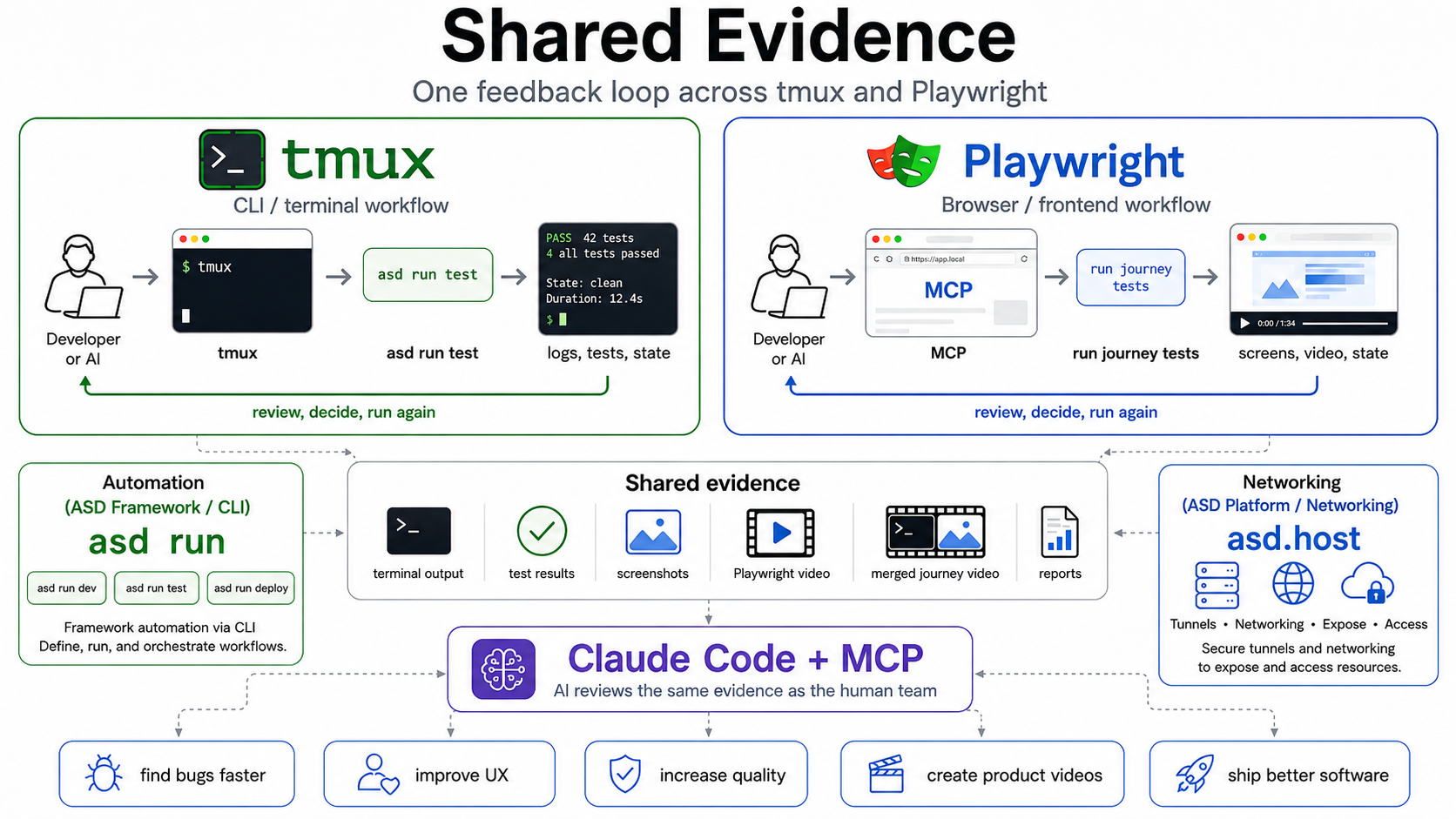
TL;DR: Testing should not just pass or fail. It should produce evidence humans and AI can review together. We've open-sourced
@accelerated-software-development/playwright-video-merge, a small package that stitches Playwright recordings into one ordered journey video. Combined withtmuxfor CLI surfaces and asd.host for exposing running systems, it gives humans, AI, and customers a single shared reality to review.
Testing should not only tell us whether something passed.
Testing should show us what happened.
That is the philosophy behind a lot of the work we do at asd.host. We want software development to become more observable, more reviewable, and more useful for both humans and AI.
It starts with a simple idea:
AI should not guess what happened.
AI should inspect the same evidence a human would.
For command-line software that evidence is a terminal session. For frontend software that evidence is the browser. Neither surface is secondary.
Same evidence for humans and AI
tmux and
Playwright are two flavours of the same philosophy: make the system observable, controllable, and reviewable through the same evidence humans already use.
The AI is no longer working from a vague prompt. It is looking at the same operational surface as the human, the same terminal, the same browser, the same flow.
That is the core idea behind everything below.
How tmux exposes the CLI
The philosophy did not start in the browser. It started in the terminal.
With tmux we can send commands into a real development session and inspect what the developer would also see, running processes, logs, failing tests, server output, shell state, command history.
The loop is mechanical: send a command into tmux, observe the same output a human would observe, identify the next useful action, change the code, run the command again, then compare the new visible state with the previous one.
That is feedback-driven AI development for the CLI.
Playwright as the browser surface
Frontend testing applies the same strategy to a different surface.
Instead of a tmux pane, the shared surface is the browser. The browser shows what the actor experiences: layout, copy, navigation, timing, friction, broken states, visual feedback.
A human can watch the journey. An AI can review the same journey. A customer can validate the same journey.
Same philosophy, different interface, better evidence.
Why ordered video changes review
A Playwright trace is useful for debugging. A screenshot is useful for one state. A video is useful for understanding a journey.
If recordings land in random order, the reviewer has to mentally reconstruct the story. That increases cognitive load, and it makes AI review unreliable because the model has to infer sequence from fragments.
If tests are written and ordered along the actor journey, the video becomes review evidence, useful for QA, UX review, AI-assisted bug detection, customer validation, sprint review, and eventually narrated product video.
Not staged demos. Not fake click-throughs. Tested flows that can be reviewed, trusted, narrated, and reused.
Installing playwright-video-merge
The package is intentionally small:
npm install -D @accelerated-software-development/playwright-video-merge
Record videos for every test, not just failures. Review evidence needs the full journey:
// file: playwright.config.ts

import { defineConfig } from "@playwright/test";

export default defineConfig({
  use: {
    video: {
      mode: "on",
      size: { width: 1280, height: 720 },
    },
  },
  reporter: [["json", { outputFile: "playwright-report.json" }]],
});
Then run the tests and merge in report order:
npx playwright test
npx playwright-video-merge --report playwright-report.json --sort report-order -o artifacts/journey.mp4 -f mp4
One ordered review artifact, instead of a folder of disconnected clips.
Hooking up the MCP server
For Claude Code, the MCP setup stays small:
{
  "mcpServers": {
    "playwright": {
      "command": "npx",
      "args": ["-y", "playwright-mcp"]
    }
  }
}
That is enough for Claude Code to drive the browser, capture screenshots, and reason over the same artifacts the team inspects.
Writing tests so they are worth reviewing
A few habits make the difference between a folder of clips and a usable journey video.
Write tests as actor journeys, not component checks. Bad title: renders form fields. Better title: agency creates a declaration and hands it over to the client. The second becomes a video chapter, a QA artifact, a customer validation moment, and eventually, with narration, a product demo segment.
Record every test, not just failures. Playwright defaults to capturing video only on failure, which is great for debugging but useless for review. Flip to mode: "on" for the suites that represent journeys, keep failure-only for noisy low-level tests.
Use stable selectors. Prefer data-testid attributes over text or placeholders. Keep a fallback chain: data-testid first, structural (input[name="..."], button[type="submit"]) second, text content never. Journeys that survive copy changes and i18n are journeys you can actually trust.
Keep commands named and stable. Give the team and the AI the same shortcuts. With asd, the network surface and the test pipeline live in one asd.yaml. One macro exposes a service over HTTPS through a public tunnel, one automation task records the journey video, and a before hook keeps .env in sync on every run:
# file: asd.yaml
version: 1
project:
  name: "demo"
  env_template: "tpl.env"

network:
  caddy:
    enable: true
    tls:
      enabled: true
      auto: true  # HTTPS via Caddy + ACME, no manual certs
  services:
    app:
      dial: "127.0.0.1:${{ env.APP_PORT }}"
      paths: ["/"]
      public: true  # exposed over the asd.host tunnel
      subdomain: "${{ env.APP_SUBDOMAIN }}"  # one macro, one HTTPS URL

automation:
  # Runs once before every top-level `asd run X`, keeps .env in sync with tpl.env.
  before:
- on: [dev, test-journey-video]
      steps:
- uses: _sync-env

  _sync-env:
- run: "asd env sync"

  dev:
- name: "Start the app"
      background: true
      run: "npm run dev"
- name: "Apply network (Caddy + tunnel)"
      run: "asd net apply --caddy --tunnel"

  test-journey-video:
- name: "Run Playwright"
      run: "npx playwright test"
- name: "Merge into one journey video"
      run: "npx playwright-video-merge --report playwright-report.json --sort report-order -o artifacts/journey.mp4 -f mp4"
Then the daily commands are short and identical for everyone, humans, agents, and CI alike:
asd run dev                  # app live on https://<subdomain>.tunnel.asd.host
asd run test-journey-video   # Playwright plus ordered journey.mp4 in one call
The exact tasks differ per project. The principle doesn't: same name, same outcome, every time.
How we write reusable skills
Skills are how we encode a workflow so Claude Code can pick it up reliably. A good skill is closer to a runbook than a prompt.
Our internal skills follow a shared shape. The front matter states one purpose in one sentence, no fluff. A selector reference covers every page the skill touches, with the data-testid, structural, never-text fallback chain spelled out. An execution protocol runs in phases, initialize, execute, report, so each step is inspectable. The report format is explicit: timings, screenshot names, console error checks. And there is a maintenance clause: when a selector breaks, fix the skill instead of working around it.
We are not publishing them yet. Once there is a sensible registry to share skills through, we will.
What ships next for the video pipeline
We are working on automating the tmux plus Playwright video merge so the terminal feedback loop and the browser journey can land in one continuous instructional video, CLI setup on the left, browser journey on the right, one timeline.
When that ships, expect more video posts here. Explaining the system by showing tested flows in motion, not staged screen recordings.
Want to try it now? Install @accelerated-software-development/playwright-video-merge from npm. Want to expose your running system the same way? Get started at asd.host.
Bonus, drop this in your CLAUDE.md
If you use Claude Code, paste this block into your project's CLAUDE.md so the agent picks up the asd CLI on day one:
**ASD CLI reference:**
- curl -fsSL https://asd.host/install.sh | bash
- `asd help`, top-level command list
- `asd schema` / `asd schema --ai`, full asd.yaml field reference (project / network / services / etc.)
- `asd schema automation`, automation YAML schema: every step type, options, and skip conditions. **Check this before hand-rolling shell. asd often supports it natively (e.g. `waitFor: <url>` instead of a custom poll script, `skipWhen.port` / `skipWhen.http` instead of conditional bash).**
- `asd rules`, AI-agent behavioural guidelines for working in asd projects (read these before generating asd config)
- `asd flow`, template-to-`.env` data pipeline (shows how `tpl.env` macros plus per-mode overlays resolve)
- `asd config validate`, validate `asd.yaml` against the schema

Kelvin Wuite
Kelvin Wuite is the founder of ASD B.V. With over eighteen years of development experience, he has witnessed the same patterns repeat across every software team - endless documentation, manual preparation, environment mismatches, and fragmented collaboration. His drive is to remove these barriers, enabling engineers to work together in unified environments with shorter feedback loops and hands-on collaboration. Since 2015 he has been refining these ideas, leading to ASD — a platform designed to create a faster, more integrated way for development teams to collaborate in an age where AI is thriving.
